Pre-deploy hooks
Run a one-off command before deploying a service.
Pre-deploy hooks are useful for one-off tasks such as:
- Database schema and data migrations
- Uploading static assets to a CDN
- Cache invalidation
- Any setup task that needs to run once before new code goes live, not on every container startup
How it works
When you run uc deploy for a service with a pre-deploy hook configured, the hook command runs after building and
pushing the new image (if building from source) but before rolling out
any new containers.
uc deploy runs your hook command inside a new container and waits for it to finish or time out (5 minutes by
default). This container inherits most of the service's configuration, including the image, environment
variables, volumes, placement, and compute resources.
If the command exits with code 0, the deployment continues with a normal rolling update. If
the command fails or times out, the deployment stops immediately with an error. uc deploy will display the latest logs
from the hook container to help you diagnose the issue.
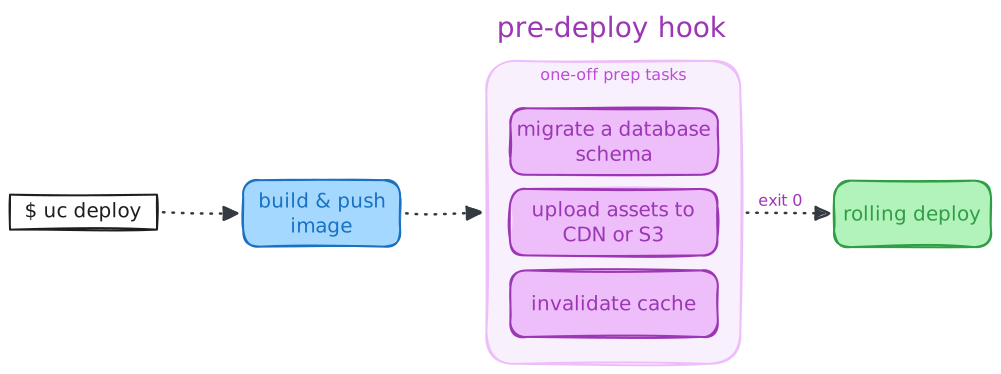
The hook runs on one of the machines where the service will be deployed. Similar to service containers, hook containers can reach other services over the network, connect to databases, and read or write shared volumes. Note that file system changes do not persist after the hook finishes, except for changes written to shared volumes.
Usage
Add the x-pre_deploy extension to a service in your
Compose file. The only required attribute is command, which can be a string or a list of strings, just like the
service's command.
services:
  web:
    build: .
    x-pre_deploy:
      command: python manage.py migrate
The command replaces the image's default command (CMD) but the
ENTRYPOINT still runs. If your image has an entrypoint,
the hook command is passed as arguments to it. You can override the entrypoint for the service using
entrypoint which applies to both
hook and regular service containers.
Since your command runs in the same image as the service, any tools or dependencies it needs must be installed in that image.
See x-pre_deploy for all available attributes and their
defaults.
Database migrations
The most common use case for pre-deploy hooks is running database migrations before deploying a new app version:
services:
  web:
    build: .
    environment:
      DATABASE_URL: postgres://postgres:${DB_PASSWORD}@db:5432/postgres
    x-ports:
      - app.example.com:8000/https
    x-pre_deploy:
      # Apply Django migrations from the built image before deploying new app containers
      command: python manage.py migrate
    depends_on:
      - db

  db:
    image: postgres:18
    environment:
      POSTGRES_PASSWORD: ${DB_PASSWORD}
    volumes:
      - db-data:/var/lib/postgresql

volumes:
  db-data:
When you run uc deploy, the migration runs first inside a new container created with the same image and environment
variables as the web service. Only after it succeeds, the deployment starts replacing service containers with the new
image.
Running multiple commands
If you need to run several tasks before deployment, you can wrap them in a single shell command:
services:
  web:
    build: .
    x-pre_deploy:
      # Apply Django migrations, collect static files, and upload them to S3 bucket
      command: sh -c "python manage.py migrate && python manage.py collectstatic --no-input"
For more complex scenarios, create a dedicated script and use it as the hook command:
- compose.yaml
- scripts/pre_deploy.sh
services:
  web:
    build: .
    x-pre_deploy:
      command: ./scripts/pre_deploy.sh
#!/bin/bash
# Ensure the script exits immediately with a non-zero code if any command fails.
set -e

python manage.py migrate
python manage.py collectstatic --no-input
python manage.py clear_cache
Make sure the script is included in your service image and exits with a non-zero code on any command failure (set -e).
Custom environment and user
The hook container inherits environment variables from the service. You can add hook-specific variables or override
existing ones with environment. Use user to run the command as a different user.
For example, if your service runs as a non-root user but the hook needs root to fix file permissions on a shared volume:
services:
  web:
    build: .
    user: app
    volumes:
      - data:/data
    x-pre_deploy:
      command: chown -R app:app /data/uploads
      user: root

volumes:
  data:
Uncloud automatically sets UNCLOUD_HOOK_PRE_DEPLOY=true in the hook container. You can check this variable in a shared
entrypoint script or your command to detect when it's running as a pre-deploy hook versus a regular service container.
Failure handling
Non-zero exit code
When the hook command exits with a non-zero code, the deployment stops immediately. No service containers are created or
replaced. uc deploy prints the latest logs from the failed hook container to help you diagnose the issue and keeps it
around for inspection. See Failed hook logs below for details.
Fix the issue and run uc deploy again to retry.
Timeout
If the hook doesn't finish within the timeout (default 5 minutes), Uncloud kills the container and fails the deployment. The killed container is kept for inspection. See Failed hook logs below for details.
You can increase the timeout for long-running tasks like large database migrations or data uploads:
services:
  web:
    x-pre_deploy:
      command: python manage.py migrate
      timeout: 30m
Failed hook logs
When a hook fails with a non-zero exit code or a timeout, uc deploy prints the last 10 log lines from the failed hook
container to help you diagnose the issue.
You can change how many lines are printed with the UNCLOUD_FAILED_CONTAINER_LOGS_TAIL environment variable. Set it to
a number or to all to print the full container log. The same setting applies to regular containers that fail during a
rolling deployment:
export UNCLOUD_FAILED_CONTAINER_LOGS_TAIL=50
You can fetch the full logs as part of the service logs with uc logs or inspect
the status of the failed container with uc inspect
or uc ps.
Idempotency
Design your hook commands to be idempotent when possible. If a deployment fails after the hook succeeds (for
example, a new container crashes on startup) and you retry with uc deploy, the hook runs again.
Most database migration tools handle this naturally since they track which migrations have already been applied.
See also
x-pre_deployreference: All available attributes and their defaults- Rolling deployments: How Uncloud updates containers with zero downtime
- Deploy an app: Build and deploy from source code or pre-built images