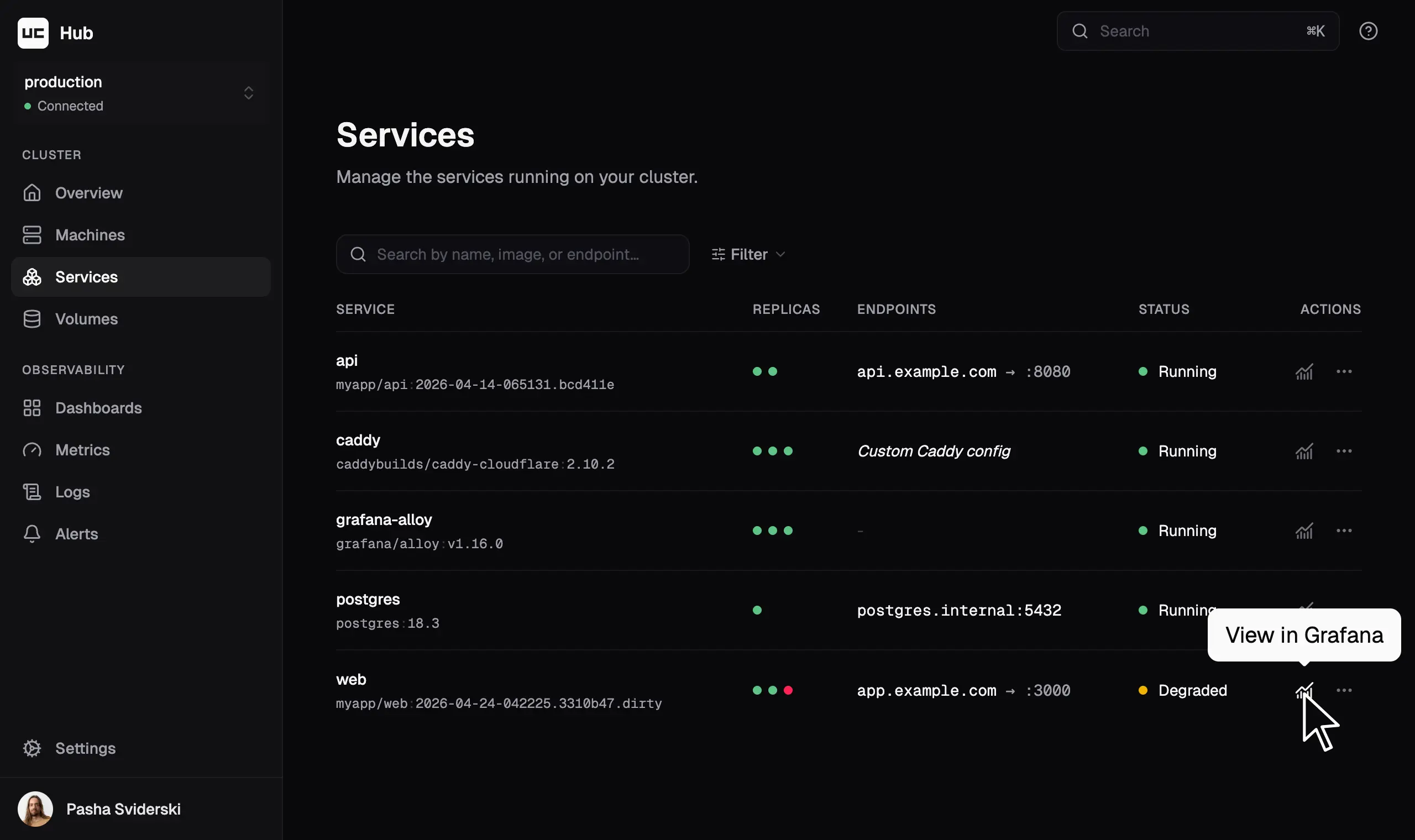
Multi-machine Docker Compose for production

Uncloud creates a Docker cluster with self-configuring WireGuard mesh, zero-downtime deploys, cross-machine scaling, automatic HTTPS via Caddy, service discovery, and an intuitive CLI. Everything you need to run web apps on cloud VMs or your own hardware, using familiar Compose files. Without cluster-management overhead.

A simpler alternative to Kubernetes, Swarm, Nomad, and Kamal.

We’re moving 300+ websites onto a dozen Uncloud machines, where each owner gets their own machines to run whatever they need.
Read Radboud University’s announcement
Miek Gieben
Miek Gieben
Creator of CoreDNS · ex-Google SRE · Radboud University

Enjoy a Heroku-like workflow on your own servers

Create a cluster

Turn any Linux machines into a Docker cluster

Uncloud creates a lightweight decentralised cluster of Docker hosts that share their state peer-to-peer. The cluster keeps running even if some machines go down.

Each machine joins a secure WireGuard mesh network, so services can talk to each other across machines.

  • Mix cloud VMs and bare-metal servers
  • No control plane or quorum to maintain
  • Cheap enough to run a cluster per team, project, or client
  • SSH is all you need

“In my opinion, Swarm is dead, Nomad is not anymore a free software since it was bought by IBM. So the only robust alternative to the bloat of K8s is Uncloud.”

Frédéric Logier (@fredix)
Build, push, deploy

Deploy local Compose to production with one command

Run uc deploy with your standard compose.yaml. It builds the images, pushes them straight to your machines (transferring only the missing layers), and shows a plan of exactly what will change. Confirm, and it rolls out with zero downtime. And all this takes seconds.

  • Standard Compose format, no new spec to learn
  • No registry to set up, pay for, or authenticate against. Powered by Unregistry
  • Terraform-style plan: review every change before applying
  • Zero-downtime rolling updates with health checks
  • Run locally or in your CI/CD pipelines

“Uncloud checks almost all the boxes for me: an imperative push model, Compose Specification, WireGuard out of the box, Caddy out of the box, Unregistry (a big one), and a great CLI UX with excellent documentation.”

@pvalders
Publish

Connect and publish your services

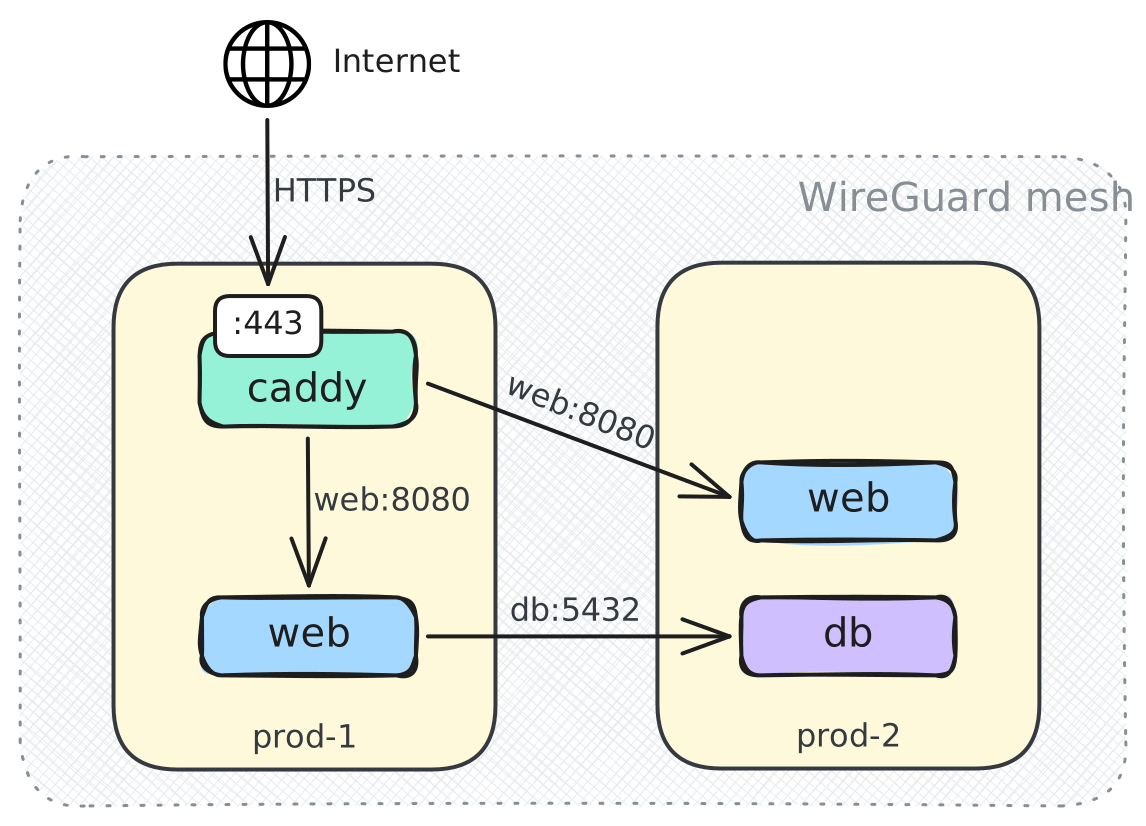
Services on different machines reach each other by name over a private WireGuard mesh, so your database never needs a public port. Publish the ones that should be public, and the integrated Caddy handles HTTPS automatically.

  • Cross-machine communication and load balancing
  • Caddy keeps its config up to date on any container change
  • Certificates issued and renewed automatically
Diagram: users connect over HTTPS to the Caddy ingress, which load balances requests to web service replicas on both machines, while web connects to the db service over the internal network.

“Before Uncloud, I was already using Wireguard, Caddy and docker-compose. Now I just have a simpler way to set it up and have it all be almost-automatically managed, plus I get DNS resolution for microservices for free.”

Paweł Zmarzły (@szawo)
Scale

Scale and grow without the ops overhead

Run more replicas spread across machines for high availability. If a machine goes down, the remaining replicas keep serving requests. Need capacity? Add a machine. Retiring one? Remove it and redeploy.

Nothing scales or reschedules on its own. It's predictable, boring infrastructure for your peace of mind.

Troubleshoot

Troubleshoot with tools you already know

When something breaks, use uc to list containers, read logs, and inspect both the WireGuard network and the live Caddy config. Or SSH in and use the familiar Docker and Linux tools. It's just Docker, WireGuard and Caddy underneath, exactly as you'd expect.

“It's all built on top of simple and familiar technologies. … This gives me confidence that if something goes wrong, I will be able to debug myself. I cannot say the same for SwarmKit or etcd.”

Paweł Zmarzły (@szawo)

Frequently asked questions

Have another questions? Ask us on Discord.

How is this different from Docker Swarm?

Swarm needs a Raft quorum of manager nodes and has been in maintenance mode for years. Uncloud has no control plane at all. Machines sync state peer to peer, and any subset keeps working. You also get WireGuard networking across clouds and even behind NAT, automatic HTTPS via Caddy, and image push without a registry. Swarm gives you none of that out of the box.

What happens when a machine goes down?

The rest of the cluster keeps working. There's no control plane to lose, and healthy replicas on other machines keep serving traffic. Uncloud deliberately doesn't auto-reschedule containers. You decide when to replace the machine and redeploy, so nothing unpredictable happens without your control.

Will it replace my CI/CD?

No, and that's deliberate. uc is just a CLI that connects to your cluster over SSH. Run uc deploy locally or in GitHub Actions to integrate with existing workflows. There are no agents to install and no pipelines to migrate.

Ready to make deploying to your own servers fun?

Subscribe to follow the development journey and get early insights into new features.
See previous newsletters.